WyzBooks gives your small business professional-grade bookkeeping, invoicing, and financial reporting — without the never-ending subscription fees.
Small business owners are paying $300–$600 per year for accounting software they don't fully use. There's a better way.
QuickBooks, FreshBooks, and Xero charge $15–$55/month. Over 5 years, you'll spend $900–$3,300 just to keep using the basic bookkeeping features your small business relies on.
Cancel your subscription and you lose access to your own financial records. SaaS vendors hold your data hostage to keep you paying month after month.
Enterprise features you'll never touch, buried settings, and confusing interfaces. You need an accountant just to set up your accounting software.
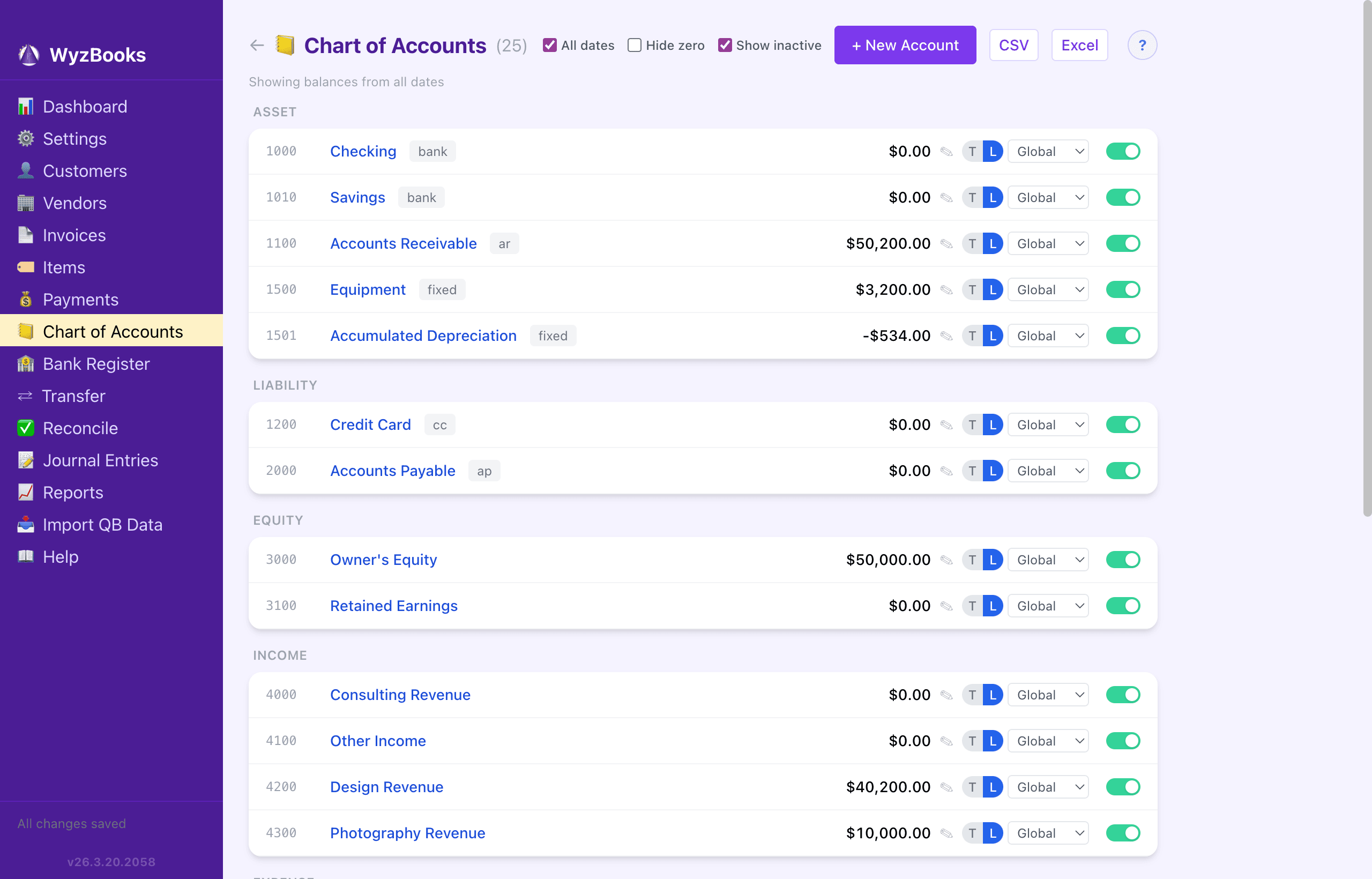
Professional-grade chart of accounts with 5 account types and 7 subtypes. Every transaction is a balanced journal entry — accuracy your accountant will appreciate.
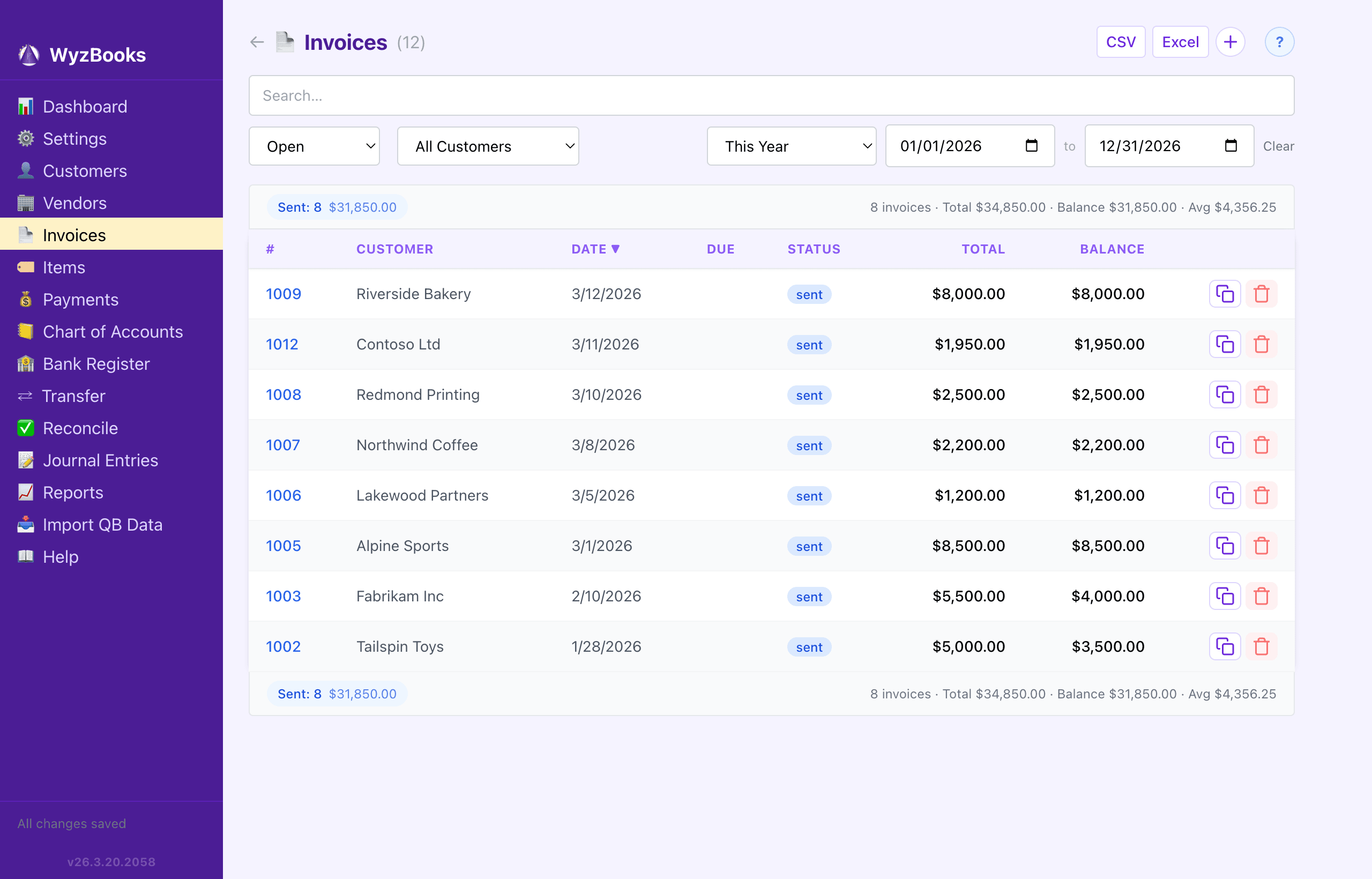
Create invoices with multiple line items, payment terms, and status tracking. Email or print to PDF with your company logo. FIFO payment matching keeps A/R accurate automatically.
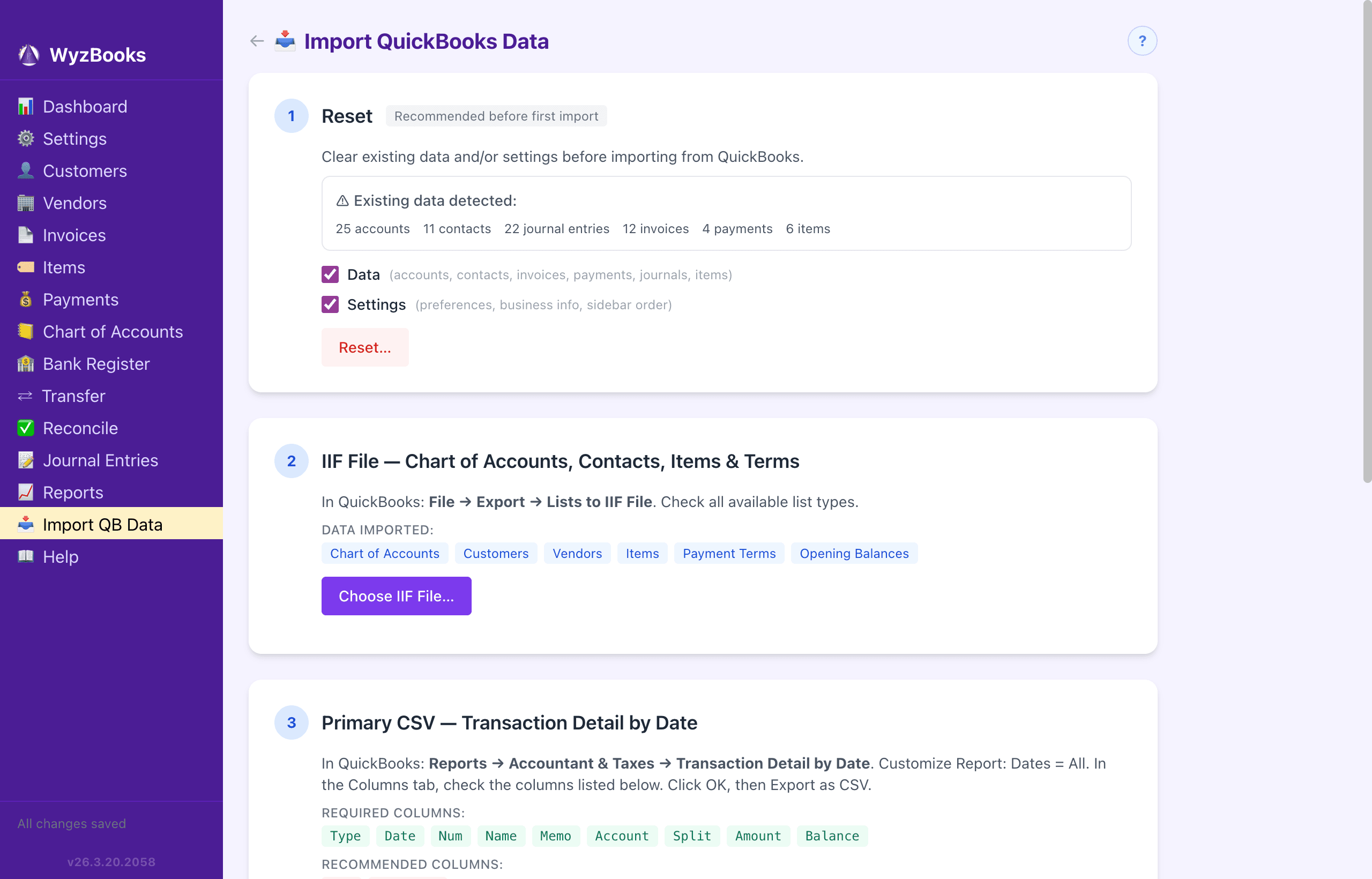
Import your entire QuickBooks file in minutes. IIF import maps all 16 account types, contacts, items, and invoices. CSV import auto-detects four formats with dual-file enrichment for line-item detail.
Bank register with CSV statement import, CSV Clear (a one-click pre-reconcile pass that matches your statement and bulk-marks cleared), credit card tracking, fund transfers, and payee-based auto-fill. Three-state reconciliation with independent Hide Reconciled / Show Cleared / Show Un-Cleared filters. Click+drag multi-select, summary bars, running balances, date range filters, and inline editing.
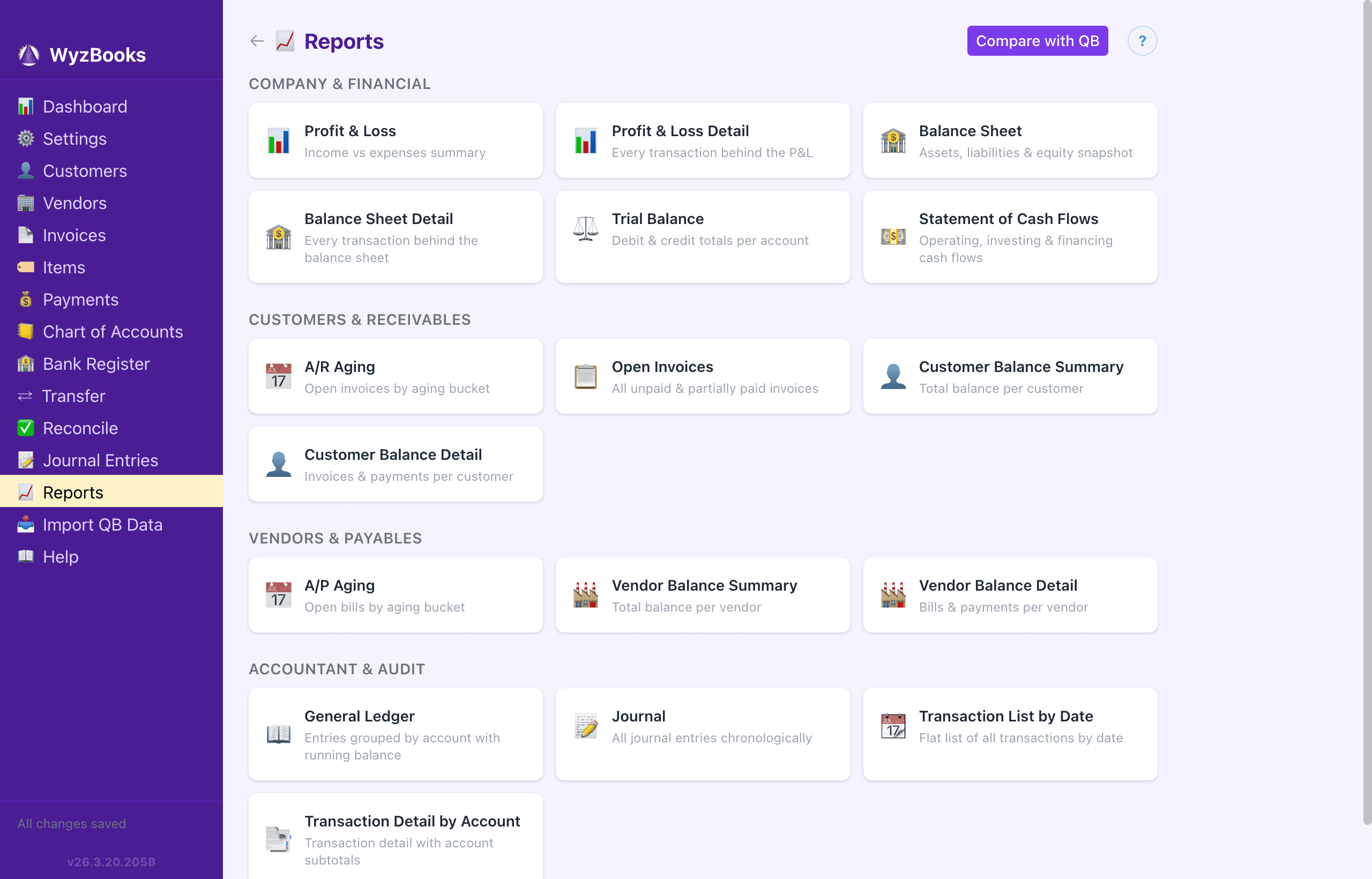
Profit & Loss, Balance Sheet, Trial Balance, A/R and A/P Aging, General Ledger, Customer and Vendor Balances, and more. Export to CSV or Excel. Compare against QuickBooks exports side-by-side.
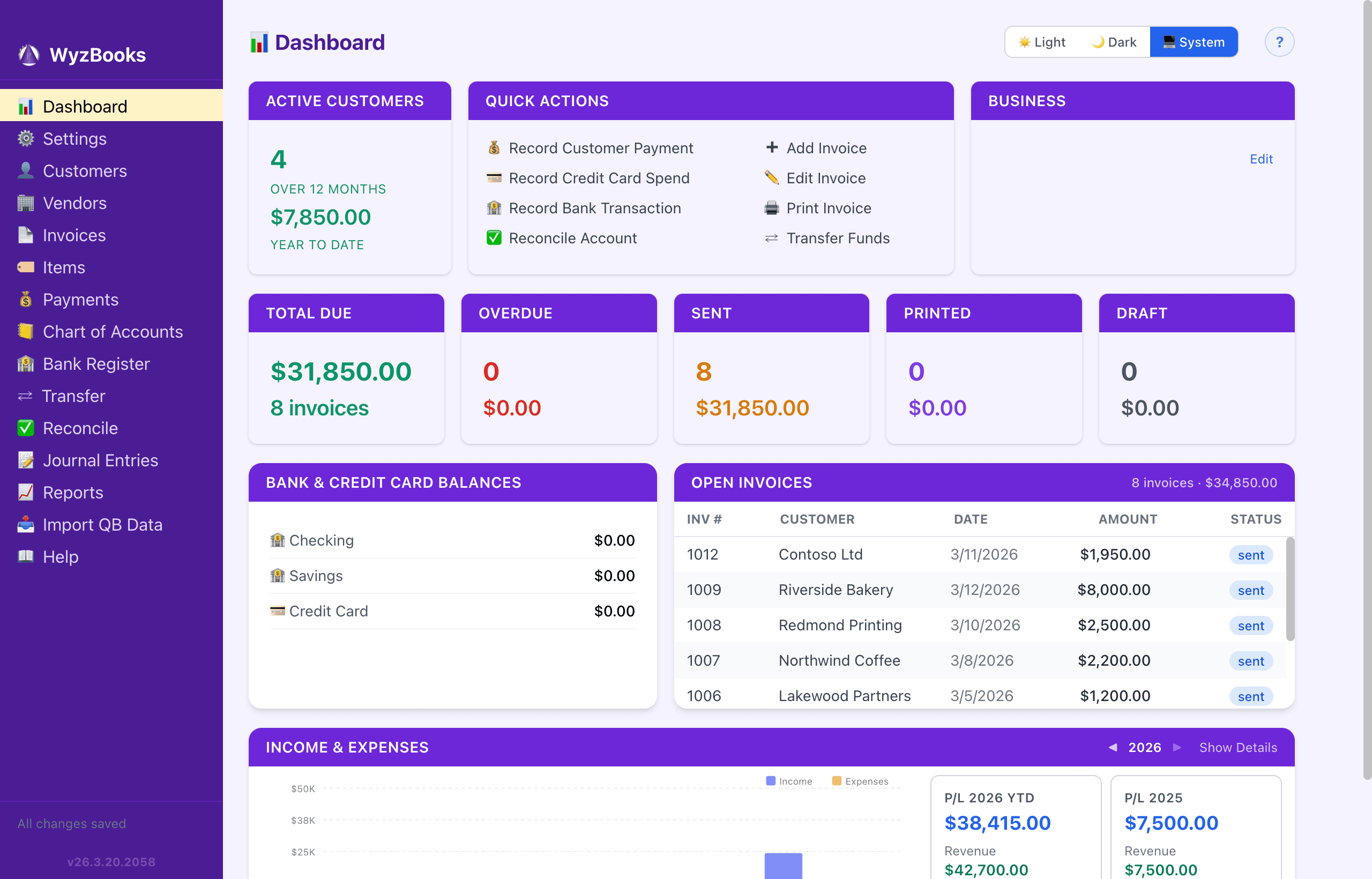
Eight shortcut buttons for common tasks. At-a-glance summaries show outstanding balances, overdue invoices, and year-over-year income with monthly bar charts. Global search in the sidebar finds any transaction, invoice, or account instantly.
Light, Dark, or System theme. Optional tabbed interface with per-tab navigation history that restores on relaunch. Drag-and-drop sidebar reordering to match your workflow.
Everything stored locally on your Mac in a portable .wyzbooks file. No cloud account required, no internet needed. Auto daily backups with 30-day retention protect your data automatically. Five independent backup layers — per-write safety copy, daily snapshots, server backups, manual exports, and Time Machine — ensure no single failure can cause data loss.
Personalize the entire app's look and feel. Five theme areas — global UI, sidebar navigation, help pages, dashboard cards, and compact view — each with built-in presets and a swatch grid color picker. Independent Light and Dark mode customization.
Built-in REST API with 18 route groups and OpenAPI documentation for external tools and automation. Install a wyzbooks shell command for CLI import, data reset, and report comparison. Power-user tools that don't get in the way.
Every data change is automatically logged with timestamps and details. Beyond the traditional audit log, every modification is also recorded as an event in an append-only event log — giving you a complete, field-level history of every change ever made. Import operations get their own dedicated log. Compliance-ready accountability built in.
Export all settings — themes, business profile, logo, sidebar order, account visibility, and preferences — to a single JSON file. Import on another Mac to replicate your exact setup. Pair with the migration workflow for a complete move.
Share your books across multiple Macs on a local network (NAS/shared folder) with automatic file locking and event-log merge. Or enable Cloud Sync to collaborate over the internet via a private server with real-time push and instant updates. All three modes — standalone, multi-user, and cloud sync — share a unified storage format, making switching between them seamless. Built-in backup system with auto daily snapshots, restore UI, and disaster recovery ensures no single device failure can cause data loss. Cloud messaging lets team members communicate in real time. Both sync modes are optional — the app works fully offline with no cloud required.
Access your books from any phone or tablet at wyzbooks.com/app. Dashboard with colored balances, invoice stat boxes, and recent invoices list. Record CC charges, log hours with date-prefilled descriptions, and record payments — all synced in real time. No app store required.
Find any transaction, invoice, or account from the sidebar search field. Results appear instantly in a grouped dropdown — click to navigate directly to the journal entry, invoice editor, or account register. Minimum 2 characters, searches payees, references, notes, account names, invoice numbers, and customer names.
Import bank or credit card statement CSVs directly into registers. Auto-detects column layout for both header-based and headerless CSVs. A three-pass matcher (same-day → ±14 days → unique-amount fallback) catches existing transactions even when posting dates differ, then presents only the truly new ones with checkboxes for one-click import. Smart category assignment from your payee history. Companion 📄Clear button does the same matching but bulk-marks the matches as cleared instead of creating new entries — a fast pre-reconcile pass.
Built-in searchable help system with 26 topics covering every feature. Full-text search finds answers across all topics instantly. Context-sensitive help icons on every page link directly to the relevant topic. Online documentation at wyzbooks.com/docs mirrors all help content with screenshots.
Designed by someone who's done their own books for decades. Every shortcut, default, and behavior exists because we use this software every single day.
Press T for today, Y for yesterday, = to advance one day, or - to go back one day in any date field. No calendars, no clicking.
Type 100+50 and press Enter — it calculates to 150. Works with addition and subtraction in any amount field.
Type a few letters in any payee, category, customer, or item field — the moment your text is a unique prefix, the rest of the suggestion is appended as highlighted text. Press Tab to accept and the amount and category pre-fill from your most recent transaction with that payee. Three fields done with five keystrokes.
Accidentally delete a transaction, invoice, or account? Press Cmd+Z to restore it instantly. Keeps up to 20 deletions.
This Month, Last Quarter, Year-to-Date, Last 12 Months — one click instead of picking two dates. Available on every list and report.
One-click jump to today's date in any register. A visual “today” marker line shows exactly where you are in the timeline.
Invoice numbers auto-increment. Due dates auto-calculate from payment terms. Change the terms and the due date updates instantly.
Click any transaction row to edit it in place — date, payee, amount, category, memo. No separate edit screen, no context switching.
Type 10 digits and it formats to (555) 123-4567 automatically. International numbers pass through as-is.
Every register shows a running balance after each transaction. You always know exactly where the account stands at any point in time.
Drop in a bank CSV and it auto-detects the column layout, matches existing entries with a three-pass algorithm (same-day, then ±14 days, then unique-amount fallback), and assigns categories from your payee history. The companion 📄Clear button uses the same matcher to bulk-mark matches as cleared — a one-click pre-reconcile pass.
Open tabs, navigation history, window size, position, and last file — all restored exactly as you left them when you relaunch.
Press Cmd+[ to go back to your previous view. Full navigation history per tab, just like a browser.
Credit card and bank transaction forms remember the last account you used. No re-selecting the same account every time.
Click any column header in any table to sort. Visual arrow shows direction. Numeric-aware: 1, 2, 10, 20 — not 1, 10, 2, 20.
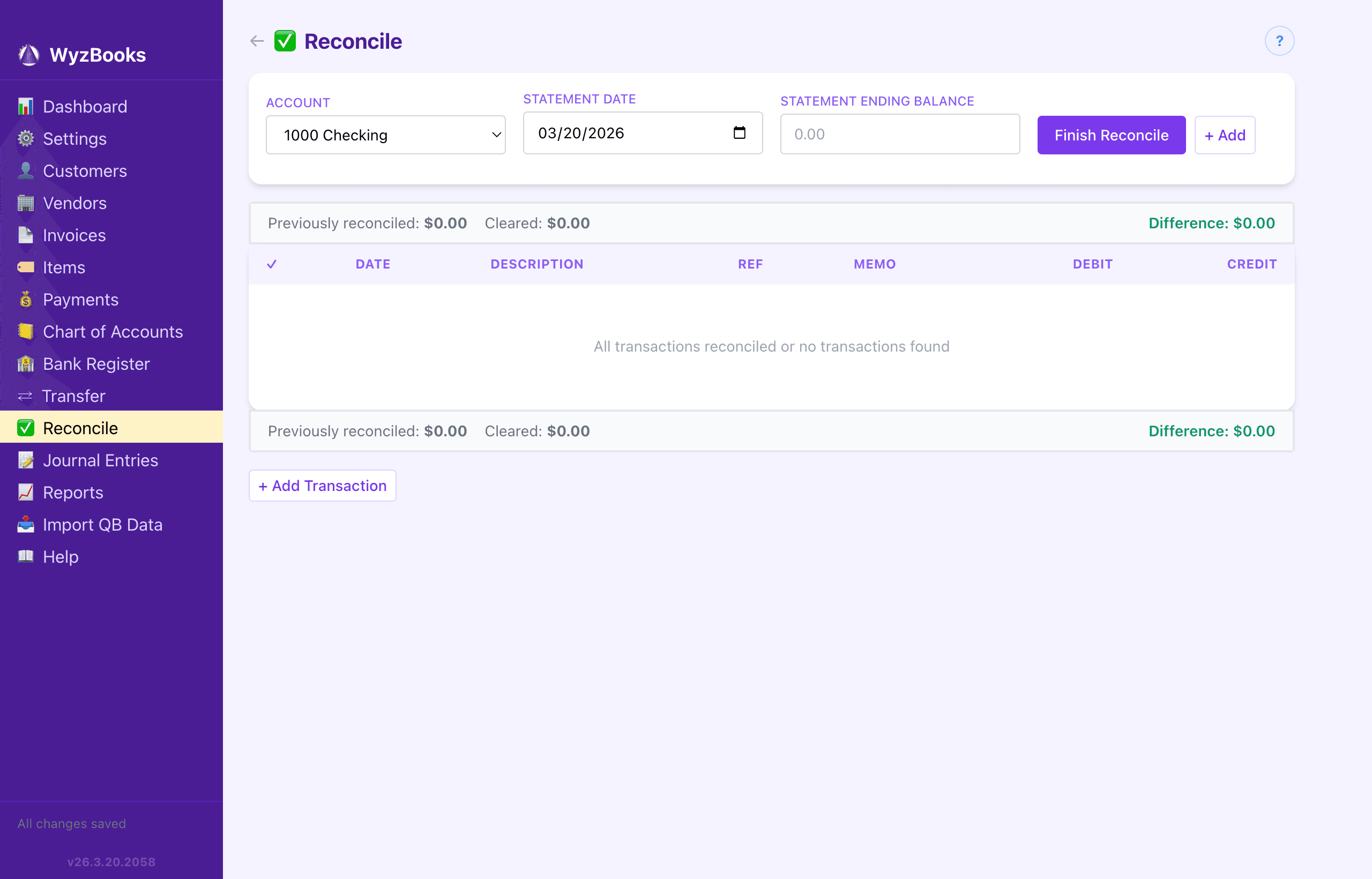
Click the R column to cycle: empty → ✓ cleared (blue) → ✓✓ reconciled (green). Independent Hide Reconciled / Show Cleared / Show Un-Cleared checkboxes on the register toolbar let you scope the view to exactly what you're working on. Cleared items pre-populate the Reconcile page.
Theme-aware summary bars on every register and list page show transaction counts, totals, and balances at a glance. The Reconcile page shows a live equation: statement balance vs. cleared balance with a green ✓ Balanced indicator.
CSV and Excel export buttons on every list and report. Auto-timestamped filenames. A toast confirms the export with the file path.
Import skips duplicate invoices and transactions automatically. Matches by number, or by date + customer + total as a fallback.

Every screen shown here is a real capture from WyzBooks running on a Mac with actual accounting data.
WyzBooks has a concrete, tested migration path. Import your data and verify every number matches.
Export your IIF file plus one or two CSV reports. Takes about 2 minutes in QuickBooks.
Drop in your files. WyzBooks auto-detects the format and imports accounts, contacts, items, invoices, and transactions.
Run any of 16 reports and compare against your QuickBooks exports. WyzBooks highlights every match and flags any difference.
All your financial data is on your Mac. No subscription. No cloud account. Cancel QuickBooks when you're ready.
No cloud account. No internet required. No one else has access to your financial records.
Your books live in a single portable .wyzbooks file on your Mac. No cloud servers, no internet connection, no third-party access. Your financial data never leaves your machine.
Auto daily backups with 30-day retention run on every launch. Manage backups from Settings — see available snapshots, create manual backups, or restore from any previous date with one click. A safety copy is always saved before every write. Five independent backup layers (per-write, daily, server, manual export, Time Machine) ensure your data survives any failure. Moving to a new Mac? Copy the file and open it.
The app works forever with or without the support plan. Every change is logged in an audit trail. Every report exports to CSV and Excel for your accountant.
WyzBooks includes a full REST API server you can deploy to your own infrastructure for automation, integrations, and real-time multi-client sync.
Full CRUD for accounts, invoices, payments, journals, contacts, items, bank transactions, and more. OpenAPI 3.0 spec with interactive Swagger UI documentation built in.
Server-Sent Events push changes instantly to all connected clients. Automatic reconnection with catch-up ensures no updates are missed, even after network interruptions.
Deploy to your own Linux server with one command. API key authentication, localhost-only binding, and Apache/Nginx reverse proxy with TLS. No third-party cloud services involved.
No monthly fees. No annual renewals. No price hikes. Just a fair one-time price for software that's yours.
All prices in USD.
See how much you save when you stop renting your accounting software.
| Software | Pricing Model | Year 1 | Year 2 | Year 3 | 3-Year Total |
|---|---|---|---|---|---|
| QuickBooks Online | $30/mo subscription | $360 | $360 | $360 | $1,080 |
| FreshBooks | $19/mo subscription | $228 | $228 | $228 | $684 |
| Xero | $15/mo subscription | $180 | $180 | $180 | $540 |
| WyzBooks | One-time license | $199 | $99 | $99 | $397 |
* WyzBooks Years 2–3 assume optional annual support plan. Without it, the 3-year total is just $199.
| Feature | WyzBooks | QuickBooks Online | FreshBooks | Xero |
|---|---|---|---|---|
| Data stored locally | ✓ Your Mac | Cloud only | Cloud only | Cloud only |
| Internet required | ✓ No | Yes | Yes | Yes |
| Mac-native app | ✓ Yes | Web browser | Web browser | Web browser |
| Financial reports | 16 reports | ~20 reports | ~10 reports | ~15 reports |
| QB import & verification | ✓ IIF + CSV | N/A | Limited | Limited |
| Cancel = lose data? | ✓ Never | Yes | Yes | Yes |
| Cloud account required | ✓ None | Required | Required | Required |
| CSV & Excel export | ✓ All reports | Most reports | Some reports | Most reports |
| Customizable themes | ✓ 5 theme areas | Limited | Limited | Limited |
| Mobile app | ✓ PWA (any browser) | iOS & Android | iOS & Android | iOS & Android |
| Multi-user sync | ✓ NAS + Cloud | Built in (cloud) | Limited | Built in (cloud) |
| REST API | ✓ 18 route groups | Paid add-on | No | Paid add-on |
| Audit trail | ✓ Built in | Paid tier | No | Paid tier |
| Bank statement CSV import | ✓ Auto-match | ✓ Yes | ✓ Yes | ✓ Yes |
| Global transaction search | ✓ Sidebar | ✓ Yes | ✓ Yes | ✓ Yes |
| Built-in searchable help | ✓ 26 topics | Online only | Online only | Online only |
WyzBooks is designed for a specific kind of business owner. Here's how to know if it's right for you.
Correct. You pay once — $199 — and you own the software forever. The optional $99/year support plan gives you major updates and email support, but it's entirely optional. Your software keeps working whether you subscribe or not.
Visit our features page to see details of every capability. If it's not right for you after purchase, we offer a 30-day money-back guarantee, no questions asked.
Nothing changes. Your data stays on your machine and the software continues working exactly as before. You just won't receive new feature updates or priority support. You can re-subscribe anytime.
Yes. WyzBooks is a native macOS desktop application. All UI dependencies are bundled — no internet connection is required to launch the app, enter data, or run reports. Cloud Sync and the Mobile PWA are optional features that require a network connection, but the core desktop app is fully offline.
Export any of the 16 built-in reports to CSV or Excel and share them directly. Your .wyzbooks file can also be opened on any Mac with WyzBooks installed. For remote access, the Mobile PWA lets anyone with the API key view invoices and balances from a phone or tablet.
Each license is tied to one primary computer. Your .wyzbooks file is a portable document that can be copied between machines if needed. Need more seats? See our Team License pricing: 15% off for 2–4 seats, 25% off for 5–9, and 35% off for 10+.
Yes. Team licenses are discounted by volume: 2–4 seats at $169/seat (15% off), 5–9 seats at $149/seat (25% off), 10+ seats at $129/seat (35% off). The optional Support & Updates plan is $49/seat/year for team licenses. Email wyzbooks@wyzaerd.com with the number of seats you need.
macOS 10.15 (Catalina) or later. WyzBooks is a universal binary that runs natively on both Apple Silicon and Intel Macs. It needs about 250 MB of disk space. Internet is only required for purchase and download — the app runs fully offline after that. No account or sign-up required.
30-day money-back guarantee, no questions asked. If WyzBooks isn't right for you, email us within 30 days for a full refund.
Yes. WyzBooks includes a Progressive Web App (PWA) that works on any phone or tablet. Open your server URL followed by /app in any mobile browser. You can view your dashboard and balances, browse invoices with full line-item detail, log consulting hours against open invoices, record credit card charges, and receive customer payments. Changes sync to the desktop in real time via SSE — and desktop changes automatically appear on mobile too, no manual refresh needed. Add it to your home screen for an app-like experience.
Yes, two ways. Multi-User Mode shares a single .wyzbooks file on a NAS or network drive with automatic file locking and event-log merge — no server needed. Cloud Sync connects multiple Macs (and the Mobile PWA) over the internet via your own private server with real-time SSE push. All three modes (standalone, multi-user, cloud sync) share a unified event-log storage format — switching between them is seamless with no data loss. A confirmation dialog explains exactly what happens when you toggle modes. When two users edit different records, both changes are preserved; when both edit the same record, last-writer-wins at the record level. Cloud Sync also includes team messaging — send short text messages between connected instances, visible on the Dashboard.
WyzBooks has a guided 4-step import wizard. Step 1: optional data reset. Step 2: import your IIF file (chart of accounts, customers, vendors, items, payment terms). Step 3: import a CSV Transaction Detail (all transactions, invoices, payments). Step 4: optionally enrich invoice line items with quantities and rates from a second CSV. The entire process takes about 5 minutes. After importing, use the built-in report comparison tool to verify every number matches your QuickBooks exports line by line.
16 reports across four categories. Company & Financial: Profit & Loss, P&L Detail, Balance Sheet, Balance Sheet Detail, Trial Balance. Customers & Receivables: A/R Aging, Open Invoices, Customer Balance Summary, Customer Balance Detail. Vendors & Payables: A/P Aging, Vendor Balance Summary, Vendor Balance Detail. Accountant & Audit: General Ledger, Journal, Transaction List by Date, Transaction Detail by Account. Every report supports date range filtering and exports to CSV and Excel.
Yes. Create invoices with multiple line items, each with description, quantity, rate, and income account. Items from your product/service catalog auto-fill description, rate, and account. Payment terms (Net 15, Net 30, etc.) auto-calculate due dates. Email or print invoices to PDF with your company logo. Track status (Draft, Sent, Printed, Paid, Overdue) and record partial or full payments with automatic A/R reconciliation using FIFO matching.
WyzBooks includes a full Express.js REST API with 18 route groups covering accounts, invoices, payments, journals, contacts, items, bank transactions, reports, import, reconciliation, and more. Interactive Swagger UI documentation is built in. The API reads and writes the same data file as the desktop app and integrates with Cloud Sync — mutations automatically broadcast to connected clients via SSE. Use it for automation, integrations, or to power the Mobile PWA.
Yes. Install the wyzbooks shell command from Settings. It supports data reset (--reset), IIF/CSV import (--iif, --csv, --csvb), invoice debugging (--dump-invoice, --dump-ar), and headless report comparison against QuickBooks exports (--compare). All arguments can be combined for scripted pipelines.
Two files: your .wyzbooks data file (File → Save) and your settings export (Settings → Export/Import → Export Settings). Copy both to the new Mac, open the data file, import the settings, and you're done. Everything — your logo, themes, business details, sidebar layout, and all accounting data — transfers exactly as it was.
Extensively. Five independent theme areas — Global UI (light and dark modes), Sidebar Navigation, Help Pages, Dashboard Cards, and Compact View padding — each with built-in presets and per-element customization via a swatch grid color picker. Save custom presets, share them via the INI config file, and switch between them instantly. You can also drag-and-drop to reorder the sidebar menu and dashboard rows.
Every data change — creates, edits, deletes, emails, and exports — is automatically logged to ~/.wyzbooks/audit.log with timestamps, action types, and details. Import operations get their own dedicated log. Logs rotate at 1 MB. The audit trail runs by default and can be toggled in Settings → Advanced.
A single portable .wyzbooks file (JSON-based) that contains all your accounts, contacts, invoices, payments, journal entries, and items. You can copy it anywhere — external drive, cloud storage, USB stick. The app also accepts legacy .ledger and .wyzaerd extensions for backward compatibility.
Yes. The Bank Register and Credit Card Register both have an Import button that accepts CSV bank statements. WyzBooks auto-detects the column layout (works with both header-based and headerless CSVs), matches imported rows against your existing transactions by amount and date, and presents a modal showing matched entries and new entries with checkboxes. Click Add Entries to import the selected rows as journal entries. Smart category assignment uses your payee history to automatically fill in the expense or income account.
WyzBooks has five independent backup layers that protect your data automatically. (1) Per-write safety copy — a .bak file is created before every write, so the previous version is always recoverable. (2) Auto daily backup — on every launch and every 24 hours, a dated snapshot is saved to a backups folder with 30-day retention. (3) Server backups — when using Cloud Sync, the server can be independently backed up via the wbctl CLI tool. (4) Manual export — Save As creates a portable .wyzbooks file you can store anywhere. (5) Time Machine — the data directory is in ~/Library/Application Support/, which macOS Time Machine backs up by default. On startup, WyzBooks verifies data integrity by checking that the stored state matches the event log. If corruption is detected, recovery is automatic. If the Cloud Sync server is lost, any desktop client can fully restore it — the server is never the single point of failure. Manage backups from Settings → Advanced → Backup & Restore.
Yes. A global search field in the sidebar searches across all journal entries (by payee, reference, note, account name), invoices (by number, customer, status, line descriptions), and accounts (by name, number, type). Results appear instantly in a grouped dropdown. Click any result to navigate directly: journal entries scroll to the matching row with a blue highlight, invoices open in the editor, and accounts open the register. The built-in Help system also has full-text search across all 24 help topics.
Join small business owners who switched to WyzBooks and never looked back. Get started today with a one-time purchase.